Two-factor authentication (2FA), also known as two-step authentication, adds a second proof of identity to the password: a code, a confirmation on the phone or a key. The Federal Office for Cybersecurity (FOCS) recommends enabling it wherever possible, at least for email, e-banking and social networks. It is enabled in the security settings of each account.
2FA complements a strong password; it does not replace it. Length, uniqueness and password managers are covered in our guide to securing your accounts. Here, there is just one question: how the second factor works, which one to choose and how to make it mandatory in an SME.
Key figures
- 3 families of factors: something you know, something you have, something you are, according to the national S-U-P-E-R.ch campaign.
- 30 days: the possible delay to recover a Microsoft account after losing its verification method, according to Microsoft.
- 7 days: the time Google may take to validate a new phone number for 2-Step Verification.
- 64% of the Swiss executives surveyed are aware of their cybersecurity liability risks, but only 19% see them as a reason for active management (Kaspersky survey, July 2026).
How does two-factor authentication work?
2FA requires at least two proofs of identity of different kinds. The S-U-P-E-R.ch campaign page of 25 May 2023, online on the FOCS website, describes three families of them. There is something you know, such as a password. There is something you have, such as a mobile phone. And finally there is something that identifies you uniquely, such as a fingerprint or your face.
The point lies in password theft. The FOCS compares 2FA to an extra padlock: even if criminals know the password, they still need a second key to log in. Microsoft puts it the same way in its help pages: without access to your security information, whoever has found your password remains locked out.
Our analysis: two successive passwords do not make real 2FA, because they belong to the same family. The second factor must be an object you hold or a characteristic of your own.
SMS, app, security key or passkey: which method should you choose?
Not all methods are equal. The table sets out what the FOCS and the major providers say about each method.
| Method | Factor | What the sources say |
|---|---|---|
| SMS code | Possession of the phone | The FOCS advises against relying on SMS alone. Microsoft has announced the gradual phase-out of SMS for personal accounts. |
| Authenticator app | Possession of the phone | The preferred method according to the FOCS, which cites a code provided by a smartphone app. |
| Notification on the phone | Possession of the phone | Google considers its prompts simpler than a code and useful against SIM card hijacking. |
| Passkey | Possession of the device | According to Google, it exists only on your devices and can neither be written down nor shared by mistake. |
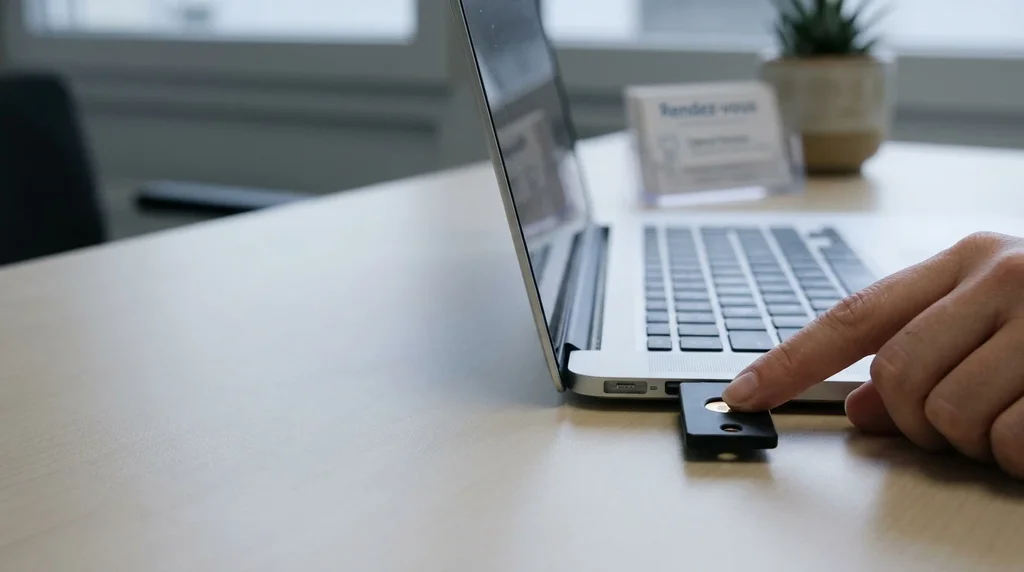
| Physical security key | Possession of a dedicated object | Google takes it into account to speed up the validation of a new number. AGOV devotes a question in its FAQ to the keys it accepts. |
The passkey changes the logic. At Google, signing in with a passkey skips the second step, since it already confirms that you have the device. By default, it can even be used to sign in without a password.
The Swiss authorities make their own choices. The FAQ of AGOV, the e-government login, published on 2 November 2026, explains why it requires the AGOV access app rather than Microsoft or Google Authenticator. It also explains why synchronisable passkeys do not work with it. Our analysis: the same user therefore juggles several second factors depending on the service.
2FA does not protect against everything. Among attacks on corporate networks, the FOCS lists phishing "in real time in the case of two-factor authentication". Our analysis: a code entered on a fake page can be relayed immediately by the fraudster, whereas a passkey, according to Google, cannot be passed on to a malicious person.
How do you enable two-step authentication on your accounts?
The options are usually found in the account's security settings, the FOCS points out. The S-U-P-E-R.ch campaign sets the priorities: email, online banking and social networks first.
- Google account (Gmail, Google Drive): open your Google account, choose "Security & sign-in", then "Turn on 2-Step Verification" under "How you sign in to Google". An account provided by an employer depends on its administrator.
- Microsoft account (Outlook.com, OneDrive): on the Microsoft account Security page, choose the sign-in management option ("Manage how I sign in"), then turn on two-step verification. A QR code links the Authenticator app to the account. Some older email apps then require an app password.
- Online banking: in Switzerland, 2FA is already standard practice, the FOCS notes. What remains is to keep your contact details up to date, as S-U-P-E-R.ch asks, in order to receive alerts about suspicious activity.
- Password manager: the FOCS recommends protecting access to it with 2FA and choosing a manager that supports it.
- Social networks: the FOCS recommends an authenticator app, in its publication of 13 January 2026 on the rise in account hacking, notably on Instagram.
What should you do if you lose your phone or your second factor?
Recovery has to be prepared as soon as 2FA is enabled. When 2FA is set up, the service provides backup codes. The FOCS advises printing them or keeping them in a safe place: this is often the only way to recover an account after losing the phone.
Microsoft recommends linking three pieces of security information to an account. Without a verification method, the password alone is no longer enough: recovery can take 30 days, and access can even be lost. At Google, a new verification number can take up to seven days.
A code is never to be passed on, not even to a friend. The FOCS describes the "Help, I need a code" scam: the hacker triggers the "forgot password" function, then asks for the code received by SMS. Once inside the account, the fraudsters often enable 2FA themselves to lock out the owner.
What should a Swiss SME require of its employees?
For the FOCS, cybersecurity is a core responsibility of management, not just a task for the IT department. On its basic protection page, the office lists secure passwords and multi-factor authentication among the main organisational measures.
The FOCS recommendations translate into concrete rules for an SME:
- 2FA on email, the company's e-banking and the password manager;
- 2FA for any remote access to the internal network, which the FOCS cites among its measures, as detailed on our page on remote working and IT security;
- an authenticator app rather than SMS, when the service allows it;
- backup codes kept off the phone;
- recovery contact details checked regularly.
The technical rule is not enough. The FOCS considers it essential to raise staff awareness in order to secure remote access. Our guide to cybersecurity awareness for employees presents methods. Our analysis: the procedure to follow after losing a second factor belongs in the cyberattack response plan. Other basic measures can be found in our section on protecting your business.
Why are executives slow to act?
A dated example: on 24 November 2026, the German-language Swiss website Inside IT reported on a survey commissioned by security vendor Kaspersky from the Censuswide institute. In July 2026, 403 executives, CEOs and owners in Germany, Austria and Switzerland were surveyed, 103 of them in Switzerland.
In Switzerland, 64% are aware of the liability risks linked to cybersecurity. Only 19% see them as an important reason to actively manage the issue. Yet 68% believe that management must implement, document and verify the measures. And 65% consider that cybersecurity remains the business of management, even when it is entrusted to the IT department or an external provider.
Swiss respondents rank ransomware as the top threat (41%), ahead of reputational damage (35%) and data loss or theft (32%). Cyber insurers are pushing 34% of them to document more, ahead of incidents they have experienced (30%) and the European NIS2 directive (25%).
The survey does not cover two-step authentication. Our analysis: making 2FA mandatory is one of the measures that management can decide on, document and monitor without a large budget, which matches the role that 68% of executives assign themselves.
What we don't know yet
- Microsoft has not published a date for phasing out SMS on personal accounts.
- The Kaspersky survey does not measure the share of Swiss SMEs that already require 2FA of their staff.
Sources
- S-U-P-E-R.ch: Double up on securing your access (25 May 2023)
- Federal Office for Cybersecurity: securing digital access (22 July 2025)
- Federal Office for Cybersecurity: identity theft on social media (13 January 2026)
- Federal Office for Cybersecurity: basic protection for businesses and authorities
- Federal Office for Cybersecurity: device protection, passwords and access control
- Federal Office for Cybersecurity: secure management of remote access
- Google: turn on 2-Step Verification
- Microsoft: two-step verification with your Microsoft account
- AGOV: questions and answers (2 November 2026)
- Inside IT: Schweizer Chefs kennen Cyberrisiken, handeln aber selten (24 November 2026)